UPS vs EPS: how fast a power station switches over
Switchover time is how long the outlets go dead between the grid dropping and the battery taking over. 47 of 56 current models publish it; 27 of those claim 10 ms or less. Brands use 'UPS' and 'EPS' loosely, so read the millisecond figure, not the label.
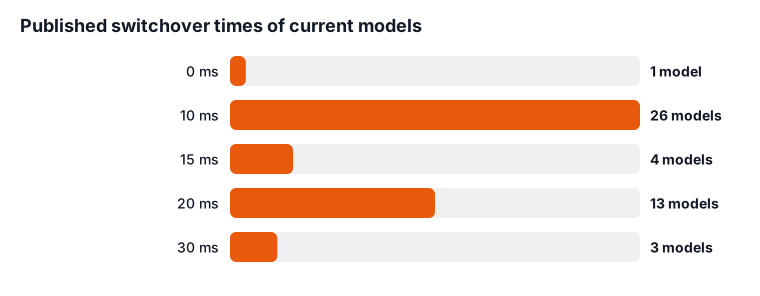
How fast do current models switch over?
| Switchover | Models |
|---|---|
| 0 ms | 1 |
| 10 ms | 26 |
| 15 ms | 4 |
| 20 ms | 13 |
| 30 ms | 3 |
What does that mean in practice?
- Routers, modems and most laptops ride through these gaps without noticing.
- Desktop computers vary: some power supplies ride through a short gap, others restart. Test it with your work saved before you rely on it.
- For medical devices such as CPAP or oxygen, follow the device maker's guidance on backup power.
- Pass-through use keeps the battery topped up from the wall; check the brand's guidance on leaving it plugged in long term.
What do official documents say about how long computers tolerate a power cut?
The ITI (CBEMA) curve, the industry reference for computer power quality, says typical IT equipment should ride through a complete power cut of up to 20 milliseconds. A station that switches over faster than that should keep most computers running.
The 3rd edition of UL 2743, the safety standard for portable power stations, adds UPS requirements for units with AC pass-through, including backfeed protection. Certification to it is required by September 24, 2027 (from Intertek's summary of the standard).
Standards Update Notice (SUN): ANSI/CAN/UL 2743 Portable Power Packs [ANSI/CAN/UL 2743:2025 Ed.3]
What should you read next?
What happens to your devices during the switchover gap?
During the gap, the station's AC outlets carry no power at all, and each plugged-in device has to coast on whatever energy it stores inside. On a station that publishes a switchover time, as 47 of the 56 current models do, wall power passes straight through to the outlets while the battery charges. When the grid drops, the station senses it, opens an internal relay and hands the load to its inverter. The published switchover time is how long that handoff takes.
What a device does in that moment depends on its power supply. Supplies with large capacitors, like laptop chargers and desktop power supplies, hold a little energy and can bridge a short gap. Devices with small or no storage, like some LED lamps, digital clocks and cheap phone chargers, may blink or reset. Motors in fans and pumps slow slightly and pick back up.
For example, if a router and a desktop share one station, the router's adapter may ride through while the desktop reboots, or the reverse. The same switchover time can produce different results on different hardware.
One exception matters. A station that runs its loads from the inverter all the time has no handoff, so there is no gap to bridge. That design is rare among portable stations, and the next sections cover how to spot it.
How many power stations switch over fast enough for a computer?
Of the 56 current models we track, 44 publish a switchover time at or below the computer ride-through reference cited in the official documents section below. Another 9 publish no figure, so you can't judge them from the spec sheet.
Here is how the 47 published figures break down:
- 27 models claim 10 ms or less. These leave the widest margin for a desktop or NAS.
- 44 models claim 20 ms or less, which includes the fast group above.
- 3 models publish a slower time: EcoFlow RIVER 2 Pro (30 ms), EcoFlow RIVER 2 Max (30 ms) and EcoFlow RIVER 2 (30 ms).
- 1 model claims no gap at all: Jackery Explorer 5000 Plus.
As a worked example, take a desktop you want to keep running through a blink. A station rated at 10 ms gives its power supply half the time to bridge that a 20 ms station does. Both sit inside the reference, but the faster one leaves room for an older or cheaper power supply that holds up for less time than the standard assumes. A station slower than 20 ms falls outside it, so treat the 3 slower models listed above as battery backup for devices that don't mind a restart.
A published figure is the maker's rating under its own conditions. It isn't a guarantee for your exact load, which is why the test steps further down matter.
Which brands publish the fastest switchover times?
Every brand in our data publishes switchover times in the same broad band, so the model you pick matters more than the badge on it.
| Brand | Models publishing it | Range |
|---|---|---|
| Anker SOLIX | 8 | 10–20 ms |
| BLUETTI | 9 | 10–20 ms |
| DJI Power | 4 | 10–20 ms |
| EcoFlow | 12 | 10–30 ms |
| Goal Zero | 2 | 15–15 ms |
| Jackery | 12 | 0–20 ms |
A few patterns stand out. Where one brand's range is wide, the brand tells you little, so check the exact model rather than the brand. Brands that publish the figure for only a few models leave most of their lineup unjudgeable on this spec.
Use the table to shortlist, then check the exact figure on the model page. Our list of power stations that work as a UPS for a computer starts from the published switchover times and adds capacity and outlet counts. For a full side-by-side of two major brands, see EcoFlow vs Jackery.
What is the difference between an online UPS, a line-interactive UPS and a power station's EPS mode?
The difference is whether your devices ever run directly from the wall. That decides whether there is a gap at all.
- Online (double-conversion) UPS. The load always runs from the inverter, and the wall only feeds the battery and inverter. When the grid fails, nothing switches on the output side, so there is no gap. If your servers or network gear can't tolerate any gap, this is the design that removes it.
- Line-interactive UPS. The load runs from the wall, with circuitry that corrects sags and surges. When the grid fails, a relay moves the load to the inverter. There is a short gap, and computer UPS makers design around it.
- Power station "EPS" or "UPS" mode. A station that publishes a switchover time works like a basic standby unit. Wall power passes through to the outlets, and the inverter takes over when the wall drops. If the spec sheet doesn't mention power conditioning, plan as if wall voltage swings pass straight through to your devices.
Brands use the labels loosely. Some call a pass-through design "UPS" and others call the same behavior "EPS". The label tells you less than the published millisecond figure does, and a claim of no gap is the only one that suggests online-style operation.
For a single desktop, a power station's big battery is the advantage. Check a dedicated computer UPS's rated runtime at your load; a few minutes is enough to save and shut down. A power station can keep the same machine running for hours, as long as the switchover suits its power supply.
Check two more lines in the manual: whether it caps how much wall power reaches the outlets in pass-through mode, and whether the USB and 12 V ports are covered or run from the battery all the time. None of this makes a station a whole-home system. To feed circuits in your house, read our guide to connecting a power station to your house through a transfer switch, and use a licensed electrician.
Which devices actually care about a short power gap?
Devices that lose work or state when they reboot care the most. Devices that simply restart on their own care the least.
- Desktop computers and workstations. A reboot loses unsaved work. Power supplies vary in how long they hold up, so the faster switchover groups above are the safer pick. See whether a power station can run a desktop computer for sizing.
- NAS boxes and home servers. A sudden loss mid-write can damage files or trigger a long disk check. A NAS that supports UPS signalling over USB can shut down cleanly when the UPS tells it to. If the station's spec sheet doesn't mention that signal, plan a manual shutdown for long outages.
- Routers, modems and Wi-Fi. A reboot costs a few minutes of connection. The ITI (CBEMA) curve says IT equipment should ride through a complete dropout of up to 20 ms (ITI (CBEMA) Curve Application Note, Information Technology Industry Council, Technical Committee 3, 2000). See whether a power station can run a router.
- Game consoles and smart-home hubs. If the power drops, they restart when it returns, though a console can lose an update in progress.
- CPAP, oxygen concentrators and other medical devices. Follow the device maker's guidance on backup power and any switchover limits. Don't rely on a station's UPS behavior for life-sustaining equipment without the maker's advice. Our page on running a CPAP from a power station covers runtime.
How long will a power station keep things running after it switches over?
Runtime after the switch depends on the battery's capacity and the total draw, including the inverter's own overhead. A small load runs much longer than a big one, but not as long as the simple maths suggests.
Network gear varies widely in draw. Comcast's energy disclosure lists its XB10 modem-router at 29 W, several times a basic extender (Comcast SNE Energy Information (CableLabs Energy Reporting), Comcast / CableLabs, 2026). The inverter also uses power just to stay on. Sandia's inverter model estimates that overhead at about 1% of rated power, and one measured 2,500 W inverter used 19.6 W at idle (Performance Model for Grid-Connected Photovoltaic Inverters (SAND2007-5036, King et al.), Sandia National Laboratories, U.S. DOE, 2007).
Here is a worked example. Take a station at the median capacity in our data, 1,208 Wh, with a 2,000 W inverter. At the site's 85% efficiency assumption, about 1,027 Wh reaches the outlets. A 29 W gateway alone would run about 35 hours. Add about 20 W of inverter overhead (1% of 2,000 W) and the total is about 49 W, which cuts the estimate to about 21 hours. Treat both numbers as estimates, since a station's real idle draw isn't published.
If your router runs on 12 V DC or USB-C, powering it from those ports can avoid much of the inverter overhead. Check the router's adapter rating first. For your own devices, the power station runtime calculator does the same sum.
How do you test a power station's switchover safely at home?
Simulate an outage by unplugging the station's own wall cord while your devices run from it, with your work saved first. This tests the real handoff without touching your home's wiring.
- Save and close anything important. Pause backups, downloads and NAS writes.
- Plug the station into the wall and let it charge fully.
- Turn on the AC output and any UPS or EPS setting the manual describes.
- Plug the device you want to protect into the station's AC outlet and start it normally.
- Pull the station's wall cord, or switch off the power strip feeding it. Watch the device for a reboot, a flicker or a warning.
- Plug the station back in and confirm the device stays on when wall power returns.
- Repeat a few times. A device that survives once may not survive every time.
Don't flip breakers or touch your electrical panel to run this test. Don't test with a medical device in use; ask its maker instead. If the device reboots, try a station with a faster published switchover, or add a small dedicated UPS between the station and the device.
Does leaving a power station plugged in all the time wear out its battery?
It can add some wear, mostly from sitting at full charge and from heat. The amount depends on the chemistry, the brand's charging design and where you keep the unit.
Heat is the factor you control. Sandia found LiFePO4 cells, the chemistry in most current stations, wore faster as temperature rose from 15 to 35 °C, while NMC cells did the opposite (Degradation of Commercial Lithium-Ion Cells as a Function of Chemistry and Cycling Conditions (Preger et al., J. Electrochem. Soc. 167 120532), Sandia National Laboratories / The Electrochemical Society, 2020). A station passing power all day sits warm. Keep it in a cool, ventilated spot, off carpet and away from a sunny window or a closed cabinet.
Check the manual for any charge-limit setting or advice on occasional discharge cycles, since this guidance differs by brand and model. For how the chemistries compare on cycle life, see LiFePO4 vs NMC vs sodium-ion.